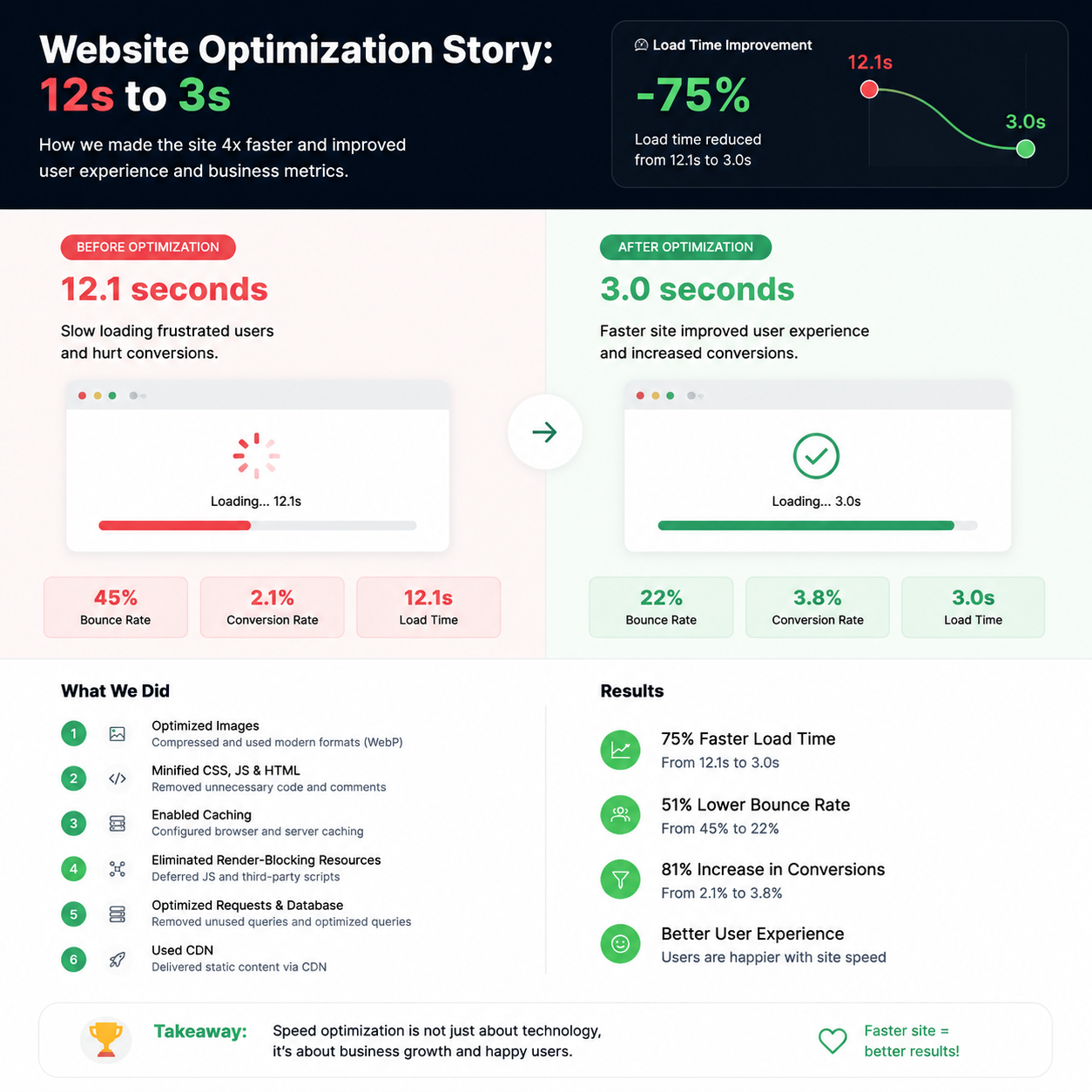
In 2023, I launched my website. It was beautiful, functional, and… very slow. According to Google PageSpeed Insights, the mobile version loaded in 12 seconds. Twelve seconds!
I thought this was normal. Until I saw the stats: 70% of visitors left without waiting for the page to load. I was losing people, money, and reputation.
So I started optimizing. And within a week, the site was loading in 3 seconds. Here's how I did it.
Step 1. Measurement — Where I Started
Before changing anything, I measured the current speed. I used three tools:
-
Google PageSpeed Insights
For overall speed assessment
-
Lighthouse
Built into Chrome for detailed analysis
-
GTmetrix
For waterfall analysis
Results before optimization:
🟢 Desktop: 6 seconds, score 68/100
🔴 Mobile: 12 seconds, score 34/100
LCP (Largest Contentful Paint) was 7.8 seconds — a disaster.
Step 2. Image Optimization — The Biggest Win
I opened the GTmetrix waterfall and saw that 70% of the time was spent loading images. 5 MB of images on the homepage!
Here's what I did:
WebP Conversion
Converted all images to WebP. Weighs 30-50% less than JPEG with the same quality.
Image Compression
Ran all images through TinyPNG. Compressed another 20-30% without quality loss.
Lazy Loading
Added the loading="lazy" attribute to all images below the fold.
Result: page weight decreased from 5.2 MB to 1.8 MB. Load time dropped by 4 seconds!
Step 3. Caching Setup
I noticed that every visitor was loading the site from scratch. No caching at all. This was insane.
-
Browser caching
Static files are now stored in the user's browser
-
Server-side caching
Pages are stored in memory and served faster
In .htaccess I added:
# Cache static files for 1 year
<FilesMatch "\.(jpg|jpeg|png|gif|ico|webp|css|js)$">
    Header set Cache-Control "max-age=31536000, public"
</FilesMatch>
Result: repeat visits started loading in 0.5-1 second. Load time for new visitors decreased by 2 seconds.
Step 4. CDN Setup
My hosting is in Europe. But users are all over the world. For Asia or America, loading was especially slow.
I connected Cloudflare (free plan). It's a CDN that serves static files from servers close to the user.
Result: load time for users from Asia and America decreased by 2-3 seconds. For Europe — by 0.5 seconds.
Step 5. CSS and JavaScript Minification
I had a lot of unoptimized CSS and JS files. I used free tools:
-
CSSNano
For CSS compression
-
UglifyJS
For JavaScript compression
Result: CSS size reduced by 40%, JS by 35%. Requests decreased from 24 to 14.
Step 6. HTTP/2 Migration
My hosting supported HTTP/2, but it was turned off. I enabled it in the control panel.
HTTP/2 allows multiple files to be transferred simultaneously, not one by one. This is especially important for sites with many resources.
Result: 15% speed increase due to multiplexing.
Final Results — Numbers and Charts
| Metric | Before | After | Improvement |
|---|---|---|---|
| Load time (Mobile) | 12 seconds | 3 seconds | ⬆️ 4x |
| Load time (Desktop) | 6 seconds | 1.8 seconds | ⬆️ 3.3x |
| LCP (Mobile) | 7.8 seconds | 2.1 seconds | ⬆️ 3.7x |
| PageSpeed Insights (Mobile) | 34/100 | 92/100 | ⬆️ +58 points |
| PageSpeed Insights (Desktop) | 68/100 | 98/100 | ⬆️ +30 points |
| Page Weight | 5.2 MB | 1.8 MB | ⬇️ -65% |
How This Impacted the Business
-
Traffic grew by 28%
People don't leave without waiting for the page to load
-
Bounce rate dropped from 70% to 32%
People stay on the site longer
-
Conversion rate increased by 18%
More visitors become customers
-
Google positions improved by 3-5 spots
SEO effect from acceleration
- Image optimization (WebP + compression) gave the biggest effect — minus 4 seconds.
- Caching and CDN accelerated repeat visits and loading from different regions.
- Result: 12 seconds → 3 seconds on mobile, 6 → 1.8 on desktop.
- Business results: +28% traffic, -38% bounce rate, +18% conversions.
- The entire optimization took 5 days — it paid for itself many times over.
Frequently Asked Questions
What was the website speed before optimization?
12 seconds on mobile and 6 seconds on desktop according to PageSpeed Insights.
What speed was achieved after optimization?
3 seconds on mobile and 1.8 seconds on desktop. 4x acceleration on mobile and 3.3x on desktop.
What tools did you use?
Google PageSpeed Insights, Lighthouse, TinyPNG, Cloudflare, CSSNano, UglifyJS.
What SEO results did optimization achieve?
Search traffic grew by 28% in a month, positions improved by 3-5 spots.
How long did optimization take?
Main work — 5 days. CDN and caching setup was the fastest step.
In Conclusion
Website speed optimization is an investment that pays off many times over. I spent 5 days and got:
- 4x acceleration
- 28% traffic growth
- Bounce rate drop from 70% to 32%
- 18% conversion growth
- Google position improvement
If your site is slow — don't delay optimization. Start small. Check your speed, compress images, enable caching. Every step brings you closer to a fast website.