I remember in 2018 when I first saw a message in my browser: "Your connection is not secure". I didn't understand what it meant and just clicked "Continue." Big mistake.
A month later, my account was hacked. Hackers intercepted my data through an unsecured connection. All because the site didn't have an SSL certificate.
After that incident, I installed SSL on all my projects. And now I want you to do the same. Let me explain what it is and how it works.
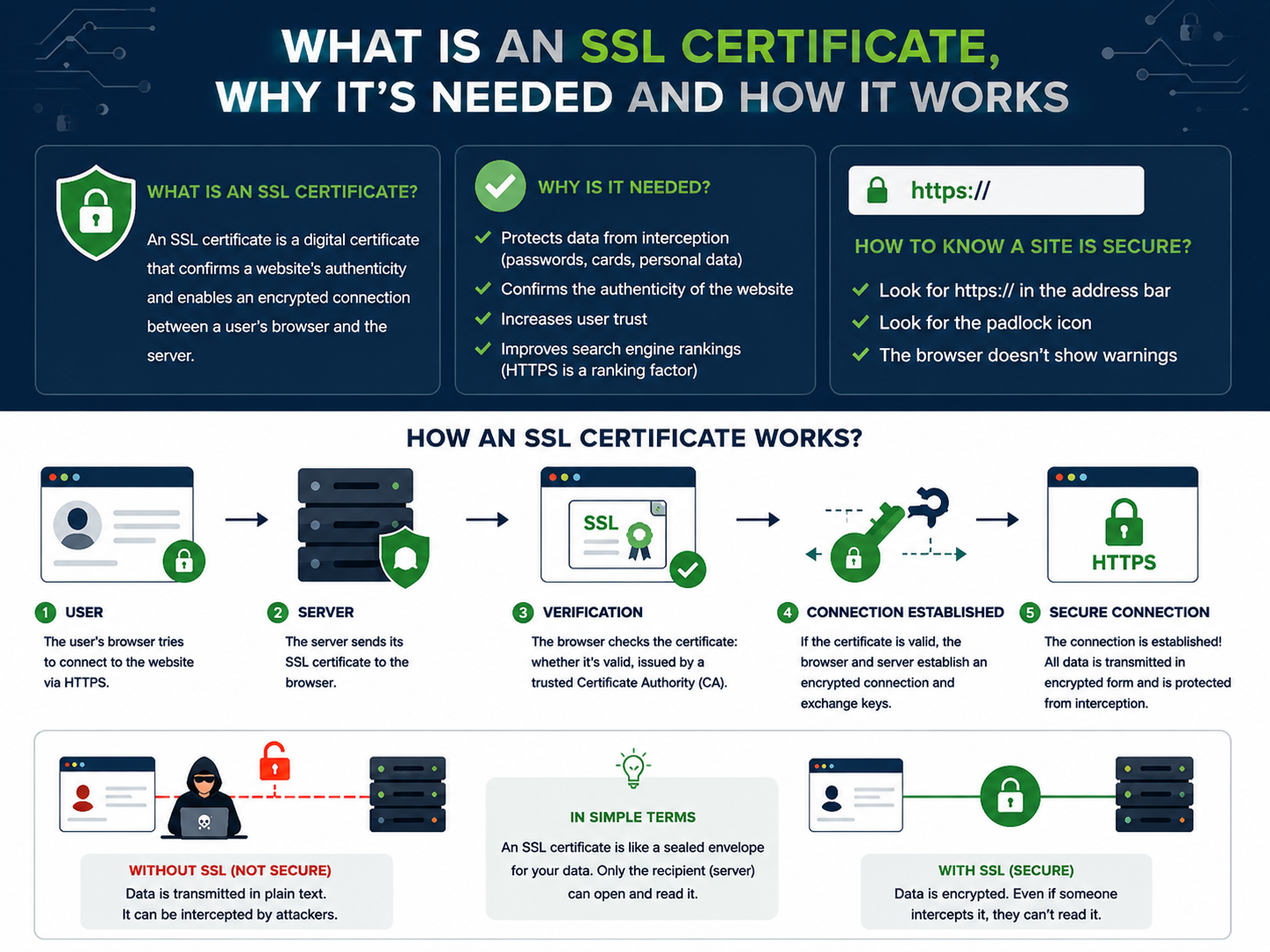
What Is an SSL Certificate in Simple Words
SSL (Secure Sockets Layer) is a technology that encrypts data between the user's browser and the website's server.
An SSL certificate is a digital document that:
- Confirms that the website is real and not a fake
- Allows establishing a secure connection
- Encrypts all data transmitted between the user and the site
In simple terms: an SSL certificate is a website's passport. It tells the browser: "This site is safe, you can send data".
Remember: A site with SSL is a site with https:// at the beginning of the address and a padlock 🔒 in the address bar.
- ❌ Data is transmitted in plain text
- ❌ Passwords and data can be intercepted
- ❌ Browser shows a warning
- ✅ Data is encrypted
- ✅ Protection from interception and tampering
- ✅ Padlock 🔒 in the address bar
How an SSL Certificate Works
Imagine you're sending a letter by mail. Without SSL — it's a postcard that any postman can read. With SSL — it's a sealed envelope that only the recipient can open.
Browser requests certificate
When visiting an HTTPS site, the browser asks the server to show its SSL certificate.
Server shows the certificate
The server sends the certificate with the public key and owner information.
Browser verifies the certificate
Checks that the certificate is valid and issued by a trusted authority.
Secure connection established
The browser and server agree on an encryption key. Data is transmitted encrypted.
Why Your Website Needs SSL — 5 Key Reasons
-
User data security
SSL protects passwords, credit card data, and personal information from interception.
-
User trust
The padlock 🔒 shows the site is safe. Users trust such sites more.
-
SEO — Google ranks HTTPS higher
Google uses HTTPS as a ranking factor. Sites with SSL rank higher.
-
Browsers mark HTTP as insecure
Chrome, Firefox, and other browsers show warnings for HTTP. This scares away visitors.
Types of SSL Certificates — Which One to Choose
SSL certificates come in different validation levels:
| Type | Validation Level | Best For | Price |
|---|---|---|---|
| DV Domain Validation |
Verifies domain ownership | Blogs, small sites | Free (Let's Encrypt) |
| OV Organization Validation |
Verifies the organization | Business websites | $50-200/year |
| EV Extended Validation |
Full legal entity verification | Banks, online stores | $200-800/year |
| Wildcard | Protects the domain and all subdomains | Sites with subdomains | $150-500/year |
For most websites, a DV certificate (Let's Encrypt) is sufficient. It's free and works great.
How to Get a Free SSL Certificate
Option 1. Let's Encrypt (recommended)
Let's Encrypt is a free SSL certificate supported by all browsers. Most hosting providers offer one-click installation.
How to install via cPanel:
- Log into your hosting cPanel
- Find the "SSL/TLS" section
- Select "Let's Encrypt"
- Choose your domain and click "Install"
Option 2. Cloudflare
Cloudflare provides a free SSL certificate for all sites connected to their CDN. Just connect your domain and enable HTTPS.
Option 3. Free SSL from your hosting provider
Many hosting providers (Beget, TimeWeb, Reg.ru) offer free SSL as a bonus. Check your control panel.
How to Install an SSL Certificate — Step-by-Step Guide
Get the certificate
Choose Let's Encrypt, Cloudflare, or your hosting provider and get the certificate.
Install on the server
- In cPanel: SSL/TLS → Manage SSL Sites → Install
- In ISPManager: domain settings → SSL → select certificate
Set up redirect from HTTP to HTTPS
# Apache .htaccess
RewriteEngine On
RewriteCond %{HTTPS} off
RewriteRule ^(.*)$ https://%{HTTP_HOST}/$1 [R=301,L]
# Nginx
server {
listen 80;
server_name example.com;
return 301 https://$server_name$request_uri;
}- SSL certificate encrypts data between the browser and the server.
- A site with SSL is https:// and a padlock 🔒 in the address bar.
- SSL protects data, builds trust, and improves SEO.
- Free SSL — Let's Encrypt, installs with one click.
- Install SSL right now — it takes 10 minutes.
Frequently Asked Questions
What is an SSL certificate in simple words?
It's a digital passport for a website that confirms its authenticity and allows data encryption.
Why does my website need an SSL certificate?
To protect user data, build trust, improve SEO, and meet browser requirements.
Where can I get a free SSL certificate?
Let's Encrypt is the most popular free option. Installs with one click through your hosting panel.
What's the difference between DV and EV certificates?
DV only verifies domain ownership. EV verifies the legal entity and shows the company name in the address bar.
How can I check if my SSL certificate is working?
Look for the padlock 🔒 in the address bar. Or use an online SSL checker.
In Conclusion
An SSL certificate is a necessary minimum for any modern website. It's free (Let's Encrypt), easy to install, and offers huge benefits: security, trust, SEO.
If your site is still on HTTP — install SSL right now. It takes 10 minutes and will save you many problems in the future.