Duplicate Remover
Remove duplicate lines from any list instantly
Settings
Unique items
Frequency
What is a Duplicate Remover?
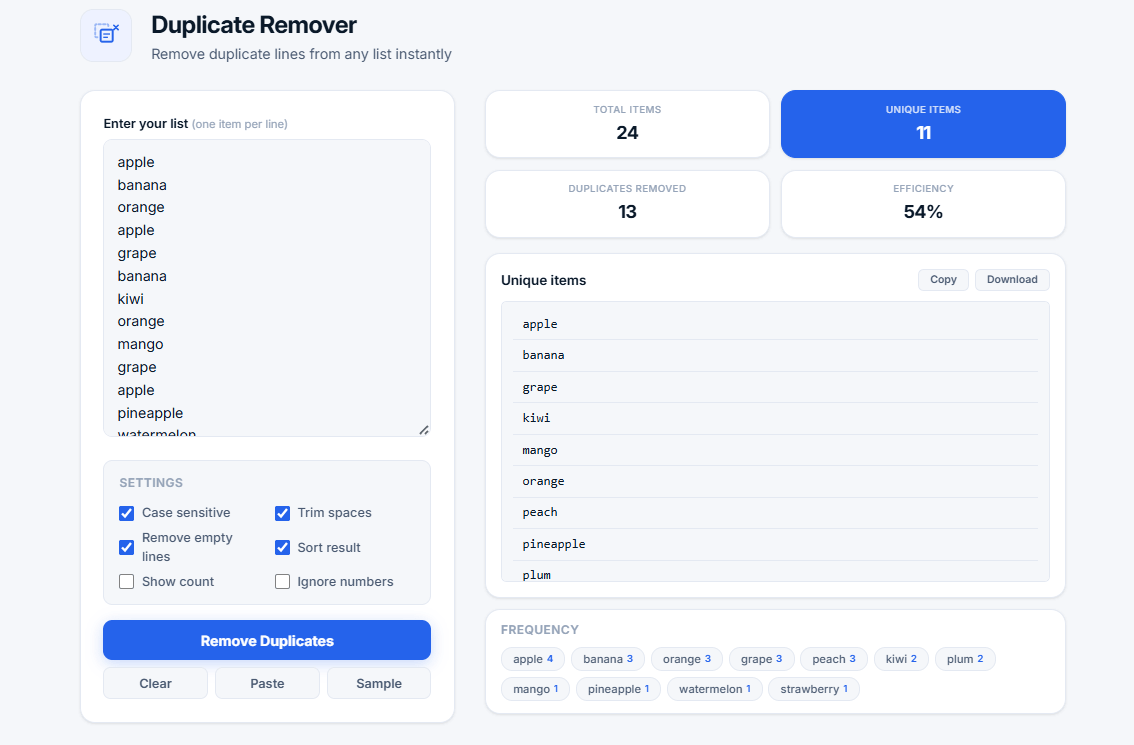
A duplicate remover is a tool that identifies and removes duplicate entries from a list. Whether you're working with text, numbers, or mixed data, this tool helps you clean your lists quickly and efficiently.
Duplicate data can cause problems in many scenarios: inaccurate analysis, wasted storage space, and inefficient workflows. Our duplicate remover solves this problem by automatically detecting and removing duplicate lines while preserving the original order (or sorting them alphabetically if you prefer).
How It Works
The duplicate remover scans your input line by line, compares each entry, and keeps only unique values. You can customize the process with various settings:
- Case sensitive — Distinguishes between "Apple" and "apple"
- Trim spaces — Removes extra spaces from the beginning and end of each line
- Remove empty lines — Eliminates blank entries
- Sort result — Arranges unique entries in alphabetical order
- Show count — Displays how many times each item appeared originally
- Ignore numbers — Filters out numeric entries
💡 Pro Tip: Use "Case sensitive" when working with proper nouns like names and places. Use "Show count" to understand which items are most frequent in your list.
Who Uses a Duplicate Remover?
- Data analysts — Cleaning datasets and spreadsheets
- Writers and editors — Removing duplicate words or phrases
- SEO specialists — Deduplicating keyword lists
- Marketers — Cleaning email lists and customer data
- Students — Organizing research data
- Developers — Cleaning configuration files and logs
- Anyone — Working with lists of any kind
Why Use Our Duplicate Remover?
- Free and unlimited — No sign-up, no limits
- Instant results — Process your list in seconds
- Multiple settings — Customize how duplicates are handled
- Visual statistics — See exactly how many duplicates were removed
- Export options — Copy or download the cleaned list
- Privacy-first — All processing happens in your browser
- Works with any data — Text, numbers, mixed content, and more
Use Cases
- Email list cleaning — Remove duplicate email addresses
- Keyword deduplication — Clean SEO keyword lists
- Data preparation — Prepare data for analysis
- Text editing — Remove repeated words or phrases
- Inventory management — Deduplicate product lists
- Contact list cleanup — Remove duplicate contacts
- Survey data — Clean survey responses
Frequently Asked Questions
What is the difference between case sensitive and case insensitive?
Case sensitive mode treats "Apple" and "apple" as different entries. Case insensitive mode treats them as the same entry and keeps only one of them.
Can I use this tool for large lists?
Yes. Our tool handles large lists efficiently. All processing happens in your browser with no size limits. You can process hundreds of thousands of entries.
What happens to my data?
Your data is processed locally in your browser. It is never sent to our servers, stored, or shared with third parties. Your privacy is 100% protected.
What formats are supported?
Our tool supports any text format where each item is on a separate line. This includes CSV files (without headers), TXT files, and copied data from spreadsheets.
Is this duplicate remover free?
Yes! Our duplicate remover is completely free to use with no sign-up required. Use it as many times as you want with no limits.
Related Text Tools
- Word Counter — Count words, characters, and sentences
- Text Diff Checker — See which lines changed after cleanup
- Case Converter — Convert text to different cases
- Password Generator — Create strong, secure passwords
- Hash Generator — Generate MD5, SHA-1, SHA-256 hashes