Word Counter
Analyze your text: count characters, words, sentences, and more — free and private
Word frequency
0 unique wordsWhat is a Word Counter?
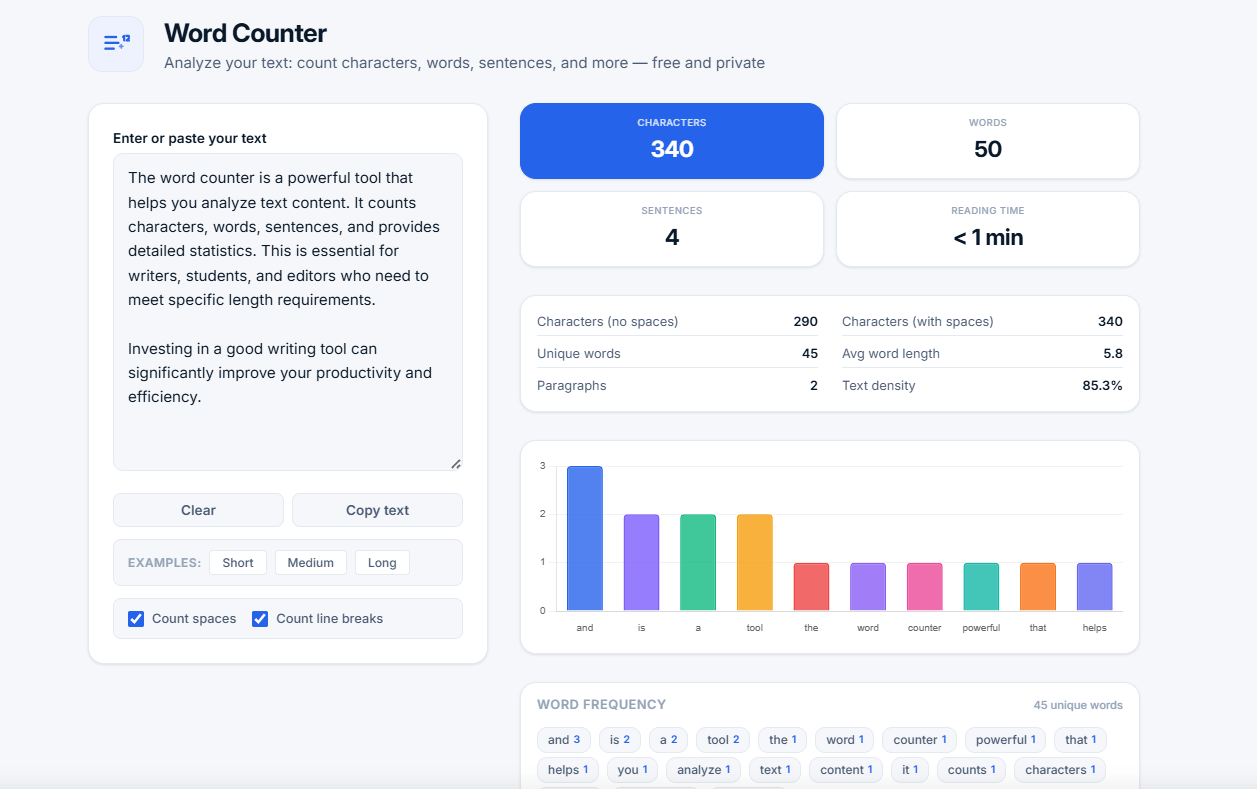
A word counter is a tool that analyzes text and provides detailed statistics including character count, word count, sentence count, reading time, and more. It's essential for writers, students, editors, SEO specialists, and anyone working with text.
Our free online word counter provides 10+ detailed metrics in real-time, including characters (with and without spaces), words, sentences, paragraphs, reading time, unique words, average word length, text density, and word frequency with a visual chart. All processing happens locally in your browser — your text is never stored or transmitted.
📝 Why use a word counter? Whether you're writing an essay, blog post, or report, knowing your word count helps you stay within limits. Understanding text density, vocabulary diversity, and reading time helps you create better, more engaging content for your audience.
Understanding the Metrics
| Metric | What It Measures | Why It Matters |
|---|---|---|
| Characters | Total characters (with or without spaces) | Essential for social media posts, SMS, and meta descriptions |
| Words | Total number of words | Meeting essay, article, and blog post requirements |
| Sentences | Number of complete sentences | Understanding text structure and readability |
| Paragraphs | Number of text blocks | Assessing text organization and flow |
| Reading time | Estimated time to read the text | Helping readers plan their time |
| Unique words | Number of distinct words | Measuring vocabulary diversity |
| Avg word length | Average letters per word | Indicating text complexity |
| Text density | Ratio of content to whitespace | Understanding content richness |
| Word frequency | How often each word appears | Identifying overused words and SEO keywords |
Who Uses a Word Counter?
- Writers — Meeting word count requirements for articles, stories, and books
- Students — Checking essay, research paper, and thesis lengths
- Editors — Analyzing text structure, density, and readability
- SEO specialists — Optimizing content length and keyword usage
- Bloggers — Planning article length and maintaining consistency
- Translators — Comparing text lengths between languages
- Social media managers — Staying within character limits for posts
- Anyone — Working with text content in any capacity
Common Use Cases
Why Use Our Word Counter?
- 100% free and unlimited — No sign-up, no hidden fees, no limits
- Real-time analysis — Updates as you type or paste
- Comprehensive statistics — 10+ detailed metrics
- Visual chart — See word frequency distribution
- Privacy-first — All processing in your browser
- Customizable — Toggle spaces and line breaks in character count
- Quick examples — Test the tool with sample texts
- Copy and clear — Easy text management
- No ads — Clean, distraction-free experience
How to Use the Word Counter
- Enter your text — Type or paste your text into the text area
- View main stats — See characters, words, sentences, and reading time at a glance
- Explore details — Review characters without spaces, unique words, average word length, paragraphs, and text density
- Analyze frequency — View the word frequency chart and list of most common words
- Customize — Toggle "Count spaces" and "Count line breaks" to change how characters are counted
Tips for Better Writing with Word Counter
- Check word count regularly — Stay within your target word count
- Monitor text density — Higher density means more content, less filler
- Diversify your vocabulary — Unique words indicate richer writing
- Keep sentences varied — Mix short and long sentences for better readability
- Use paragraphs effectively — Break up long blocks of text for easier reading
- Avoid overused words — Check word frequency to identify repetition
Frequently Asked Questions
What is the best word count for SEO?
For SEO, articles typically perform best between 1,500-2,500 words. However, quality matters more than quantity — focus on providing comprehensive, valuable content that answers users' questions.
How accurate is the reading time calculation?
Reading time is estimated based on the average reading speed of 200-250 words per minute. It provides a good approximation for planning purposes, but actual reading speed varies by individual and text complexity.
Does this tool count words in different languages?
Yes. The word counter works with all languages, including those with non-Latin scripts like Cyrillic, Chinese, Japanese, Arabic, and more. It counts words based on whitespace separation.
Can I count words without special characters?
Yes. The "Characters (no spaces)" count excludes all whitespace but includes letters, numbers, and punctuation. For a pure letter count, you would need to remove punctuation manually.
Is my text safe when using this tool?
Yes. All processing happens locally in your browser. No text is sent to any server. This is a 100% client-side tool with complete privacy.
What is a good text density score?
Text density varies by content type. For web content, 50-70% is typical. Higher density means more content and less whitespace, which can indicate more concise writing.
Related Tools
- Case Converter — Convert text to uppercase, lowercase, title case, and more
- Text Diff Checker — Compare two versions of text and review edits
- Duplicate Remover — Remove duplicate lines from text
- TXT to PDF — Convert text files to PDF documents
- Percentage Calculator — Calculate percentages quickly