Password Generator
Create strong, secure passwords for all your accounts — free and private
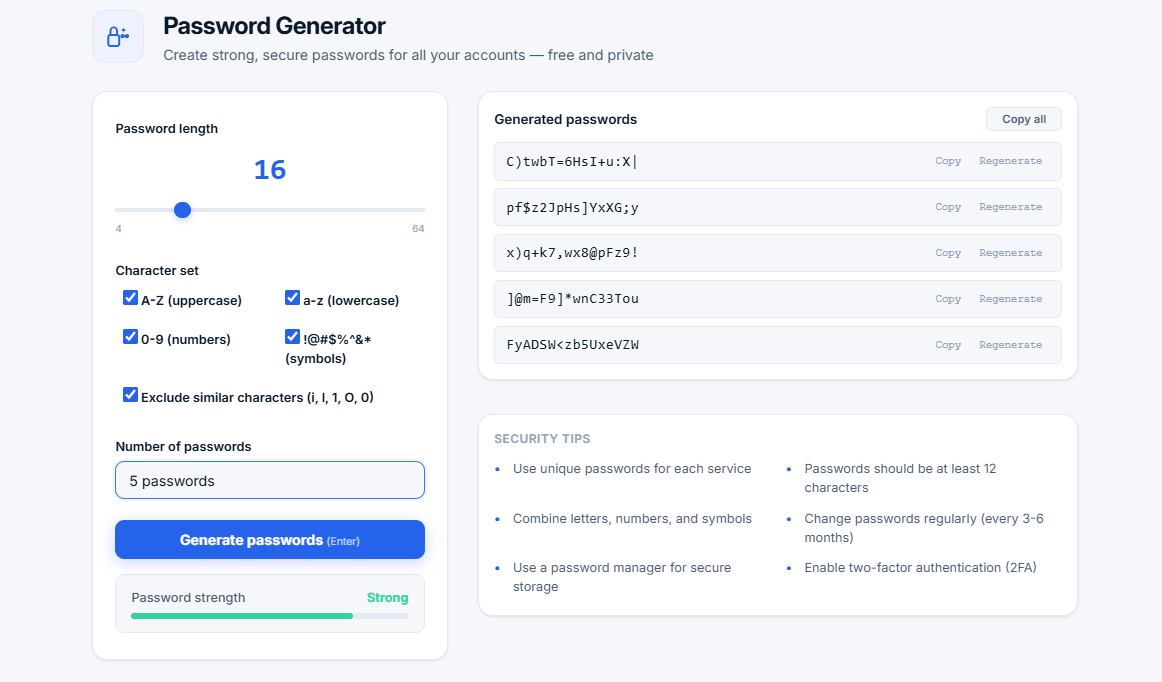
Generated passwords
Security tips
- Use unique passwords for each service
- Passwords should be at least 12 characters
- Combine letters, numbers, and symbols
- Change passwords regularly (every 3-6 months)
- Use a password manager for secure storage
- Enable two-factor authentication (2FA)
What is a Password Generator?
A password generator is a tool that creates random, secure passwords based on customizable criteria. It helps you generate strong, unique passwords that are resistant to hacking attempts, dictionary attacks, and brute-force attacks.
Our free online password generator uses a cryptographically secure random number generator to create passwords with maximum entropy. All processing happens locally in your browser — your passwords are never stored, shared, or transmitted to any server, ensuring complete privacy.
🔐 Why use a password generator? Weak passwords are the #1 cause of data breaches. A password generator creates strong, unpredictable passwords that are practically impossible to crack, protecting your accounts from hackers and cybercriminals.
How Our Password Generator Works
- Random generation — Uses cryptographically secure random number generation
- Customizable length — From 4 to 64 characters
- Character sets — Uppercase, lowercase, numbers, and symbols
- Exclude similar characters — Avoids confusing characters like i, l, 1, O, 0
- Batch generation — Generate up to 20 passwords at once
- Strength meter — Real-time feedback on password strength
Password Strength Levels
| Strength | Score | Description |
|---|---|---|
| Very weak | 0-2 | Too short or uses only one character type. Easily cracked. |
| Weak | 3-4 | Short or uses limited character types. Can be cracked quickly. |
| Medium | 5-6 | Acceptable but could be stronger. Use for low-security accounts. |
| Strong | 7-8 | Good for most accounts. Very difficult to crack. |
| Very strong | 9-10 | Maximum security. Recommended for sensitive accounts. |
Why Use a Password Generator?
- Security — Generated passwords are random and unpredictable
- Convenience — No need to think of passwords yourself
- Uniqueness — Each generated password is different
- Strength — Meets strong password requirements
- Time-saving — Generate multiple passwords in seconds
- Privacy — No storage, no tracking, no sharing
Who Uses a Password Generator?
- Everyone — Anyone who uses online accounts
- IT professionals — Managing multiple systems and user accounts
- Security-conscious users — Protecting sensitive personal and financial data
- Web developers — Creating user accounts and testing systems
- Businesses — Ensuring employee password security
- Students — Securing school and personal accounts
- Seniors — Creating easy-to-remember but strong passwords
Password Security Best Practices
- Use unique passwords — Never reuse passwords across different services
- Use long passwords — 12+ characters is recommended, 16+ for sensitive accounts
- Use all character types — Combine uppercase, lowercase, numbers, and symbols
- Use a password manager — Securely store all your passwords (Bitwarden, 1Password, LastPass)
- Enable 2FA — Two-factor authentication adds an extra security layer
- Regular updates — Change passwords every 3-6 months
- Beware of phishing — Never enter passwords on suspicious websites
Why Our Password Generator is Trusted
- Local processing — All passwords are generated in your browser
- No storage — Passwords are never saved or transmitted
- Full customization — Control every aspect of your passwords
- Strength indicator — Visual feedback on password strength
- Privacy-first — No sign-up, no tracking, no analytics
- Open source friendly — All code runs client-side
Frequently Asked Questions
What is the best password length?
Security experts recommend at least 12 characters. For maximum security, use 16-20 characters. Our generator supports up to 64 characters for those who want the highest level of protection.
Should I use symbols in my password?
Yes. Including symbols significantly increases the number of possible combinations, making brute-force attacks practically impossible. Our generator includes symbols like !@#$%^&*.
Why should I use a password manager?
Password managers securely store all your passwords in an encrypted vault. They also help you generate strong passwords and auto-fill them on websites. This eliminates the need to remember multiple complex passwords.
How often should I change my passwords?
Security experts recommend changing passwords every 3-6 months. However, if you use a password manager with strong, unique passwords, you can change them less frequently unless there's a known breach.
Can I use this generator on mobile?
Yes. Our password generator is fully responsive and works on smartphones, tablets, and desktops. Use it anywhere, anytime.
Is it safe to generate passwords online?
Yes, when using a trusted tool that processes everything locally. Our generator never sends your passwords anywhere. They exist only in your browser and are gone when you close the page.
What is the difference between a strong and weak password?
A strong password is long, random, uses all character types, and has no personal information. A weak password is short, uses dictionary words, personal information, or predictable patterns like "password123".
Tips for Creating Memorable Secure Passwords
- Use passphrases — Combine random words (e.g., "BlueCoffeeTigerMountain!")
- Use our generator — The most secure option is a completely random password
- Use a password manager — You only need to remember one master password
- Enable biometrics — Use fingerprint or face recognition on supported devices
Related Tools
- Compound Interest Calculator — Calculate investment growth
- Percentage Calculator — Calculate percentages quickly
- Word Counter — Count words, characters, and sentences
- Image Compressor — Reduce image file sizes